
Wallis Warrant Lookup Starts with the Court Name
Wallis counted 1,292 residents in the 2020 Census. A town that size posts no public warrant roster, so the court publishes procedures instead of a searchable list. Any Wallis warrant search starts with the paper in hand. A notice naming Municipal Court belongs with the city clerk. A citation marked JP4 belongs to the Austin County precinct court, even if the incident happened in or near Wallis. For an in-person visit, Wallis Municipal Court sits at 6810 Guyler Building B. Its page lists 979-478-7111, while a separate directory shows 979-478-6712. Since the two disagree, verify the number on the court page or through the city before sharing private details.
Wallis Municipal Court Contact and Document
The Wallis court keeps office hours of 8 a.m. to 4 p.m., and calls may not get answered before noon on court days. The published email is court@wallistexas.org. Check the current page for directions on filings, hearings, or a case-status question, and confirm the day's schedule before traveling. The Wallis Municipal Court page carries the contact and procedure details the city publishes.
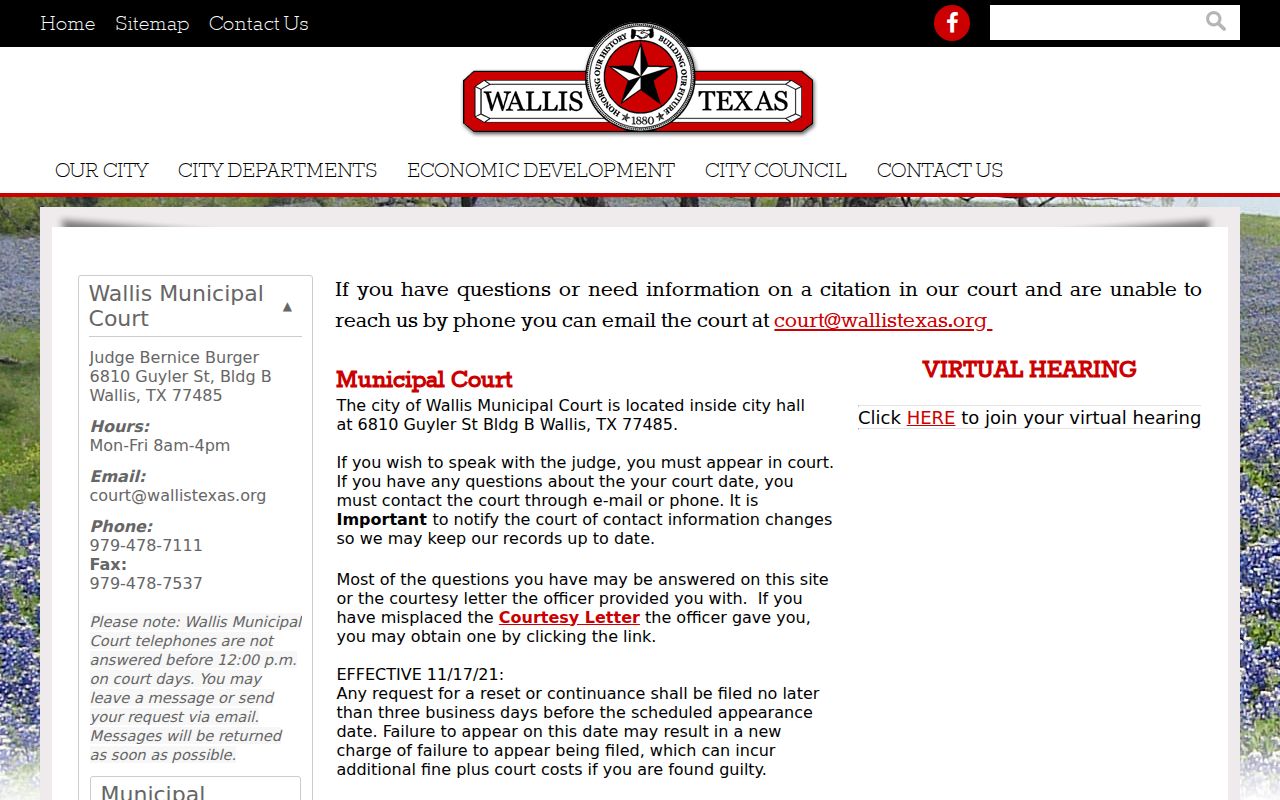
This is the Wallis court route. It posts no public warrant roster, and remote handling is not guaranteed for every hearing type.
Wallis Reset Requests Have a Lead Time
Need a new appearance date in Wallis? The court requires a reset request at least three business days before the scheduled appearance. Send it late and the court may run out of time to consider it. Use the method on the current court page. Keep proof of when you sent it. The court also warns that failure to appear may bring an additional charge or costs under its local instructions. Outcomes differ by cause. Ask the Wallis clerk what applies to yours rather than assuming every missed date ends the same way.
Remote Hearing Availability in Wallis
Wallis publishes a link for virtual hearings. A link is not a promise. Not every case or event qualifies for a remote appearance, so confirm the hearing type, the court's approval, and any identity or document steps before joining online. Never treat that link as a warrant status service. For a warrant question, ask the Wallis clerk whether the court has entered the relevant case action and what procedure comes next. If the court sets an in-person appearance, follow the notice. Another matter going remote does not change yours.
Wallis Municipal Court and JP4 Are Different
Austin County JP4 handles county cases assigned to precinct 4 and lists a Wallis contact number of 979-478-6723 at its own Birch Street office. That JP line is not the municipal court number. Both courts serve Wallis, yet their dockets stay separate. So read the case paper. Look for "JP4," "Precinct 4," or "Municipal Court" on the citation. If the court is unclear, ask the clerk to identify the file before you pay or request a reset. The county JP directory lists the precinct contacts.
Wallis Court Number and Hours Need Direct Confirmation
Wallis publishes two different phone numbers for its municipal court. One sits on the official court page and the other in a county directory. Trust neither until you check. The court page also posts a call-timing note for court days, so read the live page before dialing. If the line will not connect, the city-published court email is another listed route. Send your case identifier and ask for the current status. Never swap in JP4's number for the Wallis court. A mismatch like this is a reason to verify, not a clue about which court owns the case.
What Wallis Warrant Records May Require
Wallis publishes no public warrant search fields. Ask the clerk what appears on the case and whether a paper, date, or action is needed. Give the cause or citation number. Then ask whether the docket reflects a warrant, an outstanding setting, a reset, or a later outcome.
| Filing office | Wallis Municipal Court or Austin County JP4. |
|---|---|
| Case number | Use the citation or cause number from the notice. |
| Next date | Confirm the scheduled appearance and reset rules. |
| Payment or filing | Ask what procedure the specific court accepts. |
| Current status | Request direct confirmation from the clerk that holds the case. |
Wallis Missed Appearance Follow-Up
Missed a Wallis court date? Contact the issuing court promptly. Ask whether the record shows a failure-to-appear entry, added charges or costs, or a warrant. Keep a copy of anything you sent. Note the date and the clerk's instructions. A third-party payment portal may lack the full docket, so it cannot tell you whether a Wallis reset was granted. When status stays unclear, ask for the court's next required step in writing. An attorney can advise on the legal effect of a missed date or court order in an individual case.
Wallis Warrant Records: The Useful Identifiers
Gather your case details first. The Wallis court pages explain local procedures but promise no standard warrant-result layout, so ask the clerk whether each item applies to your case. Never read warrant status from a notice alone.
| Detail | Why it matters |
|---|---|
| Municipal or JP4 designation | Routes the request to the correct docket. |
| Cause or citation number | Helps staff distinguish similar names. |
| Appearance date | Identifies any missed or future setting. |
| Reset submission date | Shows whether a request met the three-business-day lead time. |
| Receipt or court order | Documents action; clerk confirms the docket update. |
Wallis Warrants and Austin County Record Custody
A case filed in Wallis city court will not appear in a county clerk file on its own. Austin County’s Clerk keeps county-level criminal and misdemeanor records. The District Clerk takes felony cases once an indictment lands. County JP courts keep the matters inside their own precincts. Before calling any of them, check which court is printed on your Wallis paperwork. For countywide routing, the Austin County warrant-check page lays out the clerk, sheriff, and JP paths side by side; a Wallis city citation goes back to Wallis Municipal Court.
Steps for Wallis Warrant Record Access
Call the court with one focused question. The Wallis clerk can explain how to request a record, whether a reset is still on the table, and what the court expects you to do next. Need a new date? The court’s current directions apply a three-business-day rule.
- Identify whether the case is municipal or JP4.
- Confirm the current court telephone or email from the official source.
- Provide the citation or cause number and ask about the entry and next step.
- Keep the clerk’s response and confirm later that the docket reflects any completed action.
Verify before relying: Wallis sources list different court phone numbers, and reset requests need advance notice. Confirm both details with the city court.
Wallis Warrant Status Is a Court Question
Police tips, a county directory entry, and a payment receipt each fall short of proving where a Wallis case stands right now. Only the clerk keeping the docket can speak to that. Ask that office how its records-request process works and whether any limits apply to a public document you want copied. Warrant records are not a screening tool for decisions about people. For advice on a specific Wallis case, talk to a Texas attorney.